
SEO Magento : optimize your e-commerce referencing
Is your Magento e-shop under development or improvement?
One of your priorities must be to ensure that more and more customers can find you. Therefore, every e-merchant has to think about Magento natural referencing to stand out on search engines.
As an agency specializing in both Magento e-commerce site development and SEO, our team has optimized over 300 websites! Here is a compilation of the different optimizations that we systematically implement.
15 SEO tips for Magento
Identify SEO problems
Before committing anything, start by using an analysis tool to detect SEO errors throughout your Magento. A number of poorly managed problems can have a direct impact on the performance and natural referencing of your e-commerce: redirects, tags, duplicate content…
Facilitating navigation
For a search engine to be able to index all the content of the site, the Magento must have a good internal link structure. In addition, a structured architecture impacts SEO and provides a better user experience:
- Organize your product pages into easy-to-understand categories that are easy to navigate.
- No page should be more than three mouse clicks away.
Optimize loading speed
Most of the visitors of your Magento e-shop will leave it if the pages do not load fast enough. This bad experience will not make them want to return.
It is therefore very important to optimize the “webperf” of your Magento by reducing as much as possible the display speed of the pages, by compressing the images of the products or by identifying the main code problems. Google will reward you by giving you a little boost in the ranking of its search results.
Integrate customer reviews
Product pages with comments reassure the customer by enriching the information available to them. This comfort translates into a higher conversion rate.
In addition to boosting sales, the presence of customer reviews reinforces the density of keywords related to the product. Customer reviews thus improve natural referencing since Google rewards frequently updated pages. Each new review updates the content of a page and thus contributes to making it unique.
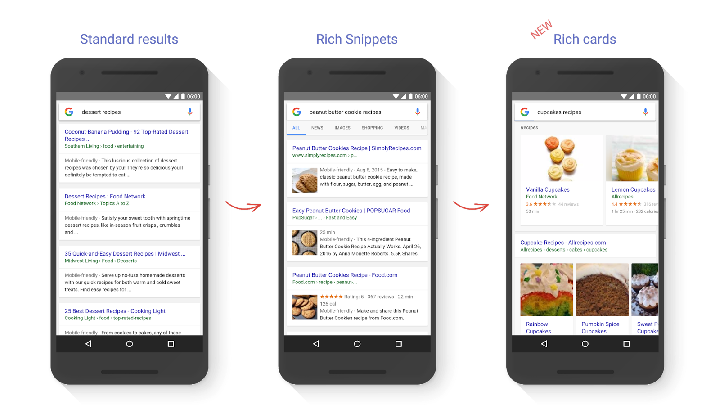
Add rich snippets + Google Rich Cards (new for 2016-17)
Rich snippets are additional information such as price, photo, availability or customer reviews. They can be displayed alongside the meta description in Google search results and are not just there to look pretty. If rich snippets are indeed eye-catching, their implementation results mostly in better click-through rates and SEO optimization of your Magento.
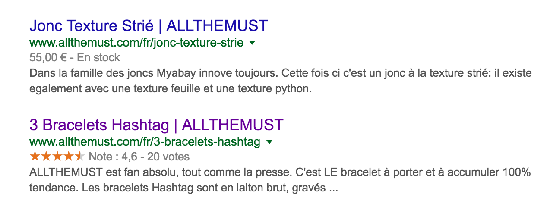
Example of rich snippets for customer reviews
Like rich snippets, rich cards use schema.org markup to display web page content in an attractive and visual way in Google mobile search results. These new rich snippets offer an additional opportunity to make your products stand out in search results.
Identify relevant keywords
Too often underestimated, this step is nevertheless crucial. Make sure the keywords you use match what people are looking for. All your pages must point in the same direction by exploiting the entire lexical field of your activity. The more your pages talk about the same subject, the more Google will consider your site relevant to that subject.
The most complicated remains to find the middle ground between keywords saturated by competition and less popular keywords, but can position you as a leader on a certain niche. Tools like Google Trends or Google Adwords Keyword Tool can help you quantify demand and saturation.
Fill in the metadata manually
Meta tags remain one of the most important aspects of SEO. In most cases, the Internet user will see them first after a Google search. It is therefore essential to make the most of this first interaction by playing on seduction and including a call to action. As for search engines, they use these meta tags in part to determine the relevance of your page to a user’s search.
For all your product pages, categories and CMS, fill in manually :
- The title
- The meta description
- The keywords
Each of these metadata must be unique and include your keywords, preferably at the beginning. They also need to be representative of the page content. They must encourage the user to click, but the latter must not be disoriented when he arrives on the page and finds a content totally different from what was announced.
Note that Magento offers the possibility to define a prefix or a suffix that will be displayed automatically in the metadata. You can fill in the name of your shop or a small slogan.
Setting up SEO-friendly URLs
A relevant URL tells Google what the page is about while giving visitors useful information about the page. All the URLs of your Magento site must therefore be unique and short, containing only three or four keywords related to the content.
By default, Magento generates a URL using the product name and category. However, it is recommended that you disable the “use category path for products” option to remove the category name from the URL of a product page. Prefer manual customization of your URLs in order to :
- Reduce their length
- Avoiding redundancy
- Avoiding unnecessary words
The following URL: sitewebmagento.com/category/product-name will thus be replaced by sitewebmagento.com/product-name
Beware, for a multi-language store, it will be necessary to make your URLs independent of one language or another.
Add a canonical URL for each page
For the SEO of a Magento e-commerce, adding a canonical URL is very useful. It allows to indicate to Google and other search engines the indexing URL of a page. With the many filters that can be included on Magento (colors, price ranges, etc.), the canonical URL actually prevents Google from indexing all the URLs declined via different filters of the same product page.
The canonical URL is in this form:
< link rel=”canonical” href=”http://www.example.org/example.html” />
Optimize Magento e-commerce for mobile
Online shopping is a growing trend and 1 in 4 purchases are now made on mobile devices. So now is the time to make your Magento e-shop mobile-friendly. Sites that are not optimized for mobile devices are even punished by Google, which gradually pushes them down the search results.
For a natural referencing in your favour, adapt your e-commerce site to a mobile experience favouring conversions and sales. Several libraries such as JS or jQuery provide responsive code for Magento.
Optimize images
The images of an e-shop will impact the user much more than any other type of website. They are also one of the most looked at elements in the referencing, via the image search engines.
It is essential, for each of your images, to ensure :
- Give a meaningful file name.
- Enter the title of the image: which will be displayed on hovering.
- Fill in the alt attribute: describe the image with your keywords.
These three elements will provide additional information to search engines and improve the natural referencing of your products.
Work on the content and avoid duplication
One of the Magento SEO rules, valid for any other site, is that content is king. Even if it can be tempting to duplicate a description or a text, the ideal remains to work on unique contents. Resist the temptation to use the same content for different products, even if they look the same! Google does not appreciate duplicate content, but above all likes rich and original content.
Arm yourself with a little patience and write SEO friendly content of at least 300 words for each product, including your keywords. This will not be a waste of time for your SEO; and it will have the added benefit of giving your customers an individualized product description.
Structuring the content
The structure of your Magento pages should follow a basic pattern:
- Product and category page titles must appear in an h1
- Important information/headings should be included in h2 and/or h3 tags
These tags tell Google and other search engines how important the information on the page is.
Automatic generation of the sitemap file
On Magento, you can configure and generate automatically your sitemap file. This allows to indicate to search engines where your content is located and will facilitate the indexing of all the pages of your e-shop site.
A sitemap needs to be regenerated at each content change. In your Magento, activate the CRON tasks to update it.
Set up redirects (301)
Almost nothing is worse for your SEO than a user clicking on a link and then landing on an error page that makes them instantly close your site.
In order to avoid disappointment, to optimize your bounce rate and to maximize the time spent on your e-commerce by Internet users arriving from search engines, it is essential to set up redirections.
Magento offers this feature called “URL Rewrite Management”. It allows you to automatically redirect a user from an old deactivated page to a new page of your Magento.
Improving the SEO of your Magento e-shop is an ongoing process that requires staying up to date with SEO best practices.
Regularly test your site to correct any errors, keep analyzing keywords, closely monitor Google’s algorithm updates, and make any necessary changes. Your greatest reward will come from the Internet users and the improvement of your position in the search engines.
To implement some of these SEO tips, check out our list of the best Magento 1 and Magento 2 modules











Leave a Reply
You must be logged in to post a comment.